
Download PowerVideoMaker – Convert PowerPoint to Video, Free, Secure
Overview
PowerVideoMaker is a dedicated Windows utility that transforms PowerPoint slideshows into fully‑featured video files such as WMV, AVI, MPEG‑1 and MPEG‑2. Built for the design & photography niche under the presentation subcategory, the tool targets users who need a reliable way to share presentations on platforms that do not support native PPT files. The current version, 2.9, was last updated on February 27 2008 and remains compatible with legacy operating systems ranging from Windows 98 SE to early Windows XP releases. Though distributed as a trial version, PowerVideoMaker delivers a full‑featured conversion engine without the need for additional codecs or plug‑ins. Its lightweight footprint (requiring far less disk space than many modern video editors) makes it especially popular in bandwidth‑constrained regions such as India, the Philippines, and parts of the United States. The interface is English‑only, emphasizing simplicity: users import a .ppt or .pptx file, select the desired output format, tweak basic video parameters, and launch the conversion with a single click. Because the software works offline, it offers a secure environment free from cloud‑based privacy concerns. Over 170 000 downloads since its 2005 debut testify to its lasting relevance for educators, marketers, and corporate trainers who still rely on PowerPoint as a primary content creation tool.
Key Features
- Direct conversion of PowerPoint (.ppt, .pptx) to WMV, AVI, MPEG‑1, MPEG‑2.
- Preserves slide animations, transitions, and embedded multimedia.
- Adjustable video resolution, frame rate, and audio bitrate.
- Batch processing – convert multiple presentations in one session.
- Standalone Windows executable – no additional codecs required.
- Lightweight installer (under 10 MB) suitable for older PCs.
- Preview window to verify output before final rendering.
- Simple, English‑only UI designed for non‑technical users.
- Free trial with full conversion capabilities (watermark‑free).
- Support for legacy Windows versions (98 SE, ME, 2000, XP).
Installation & Usage Guide
Getting started with PowerVideoMaker is straightforward. First, download the installer from a reputable source—preferably the official product page or a trusted software repository. The .exe file is typically under 10 MB, making it quick to download even on slower connections. Run the installer and follow the on‑screen prompts: accept the license agreement, choose an installation folder (the default C:\Program Files\PowerVideoMaker works for most users), and let the wizard copy the necessary files.
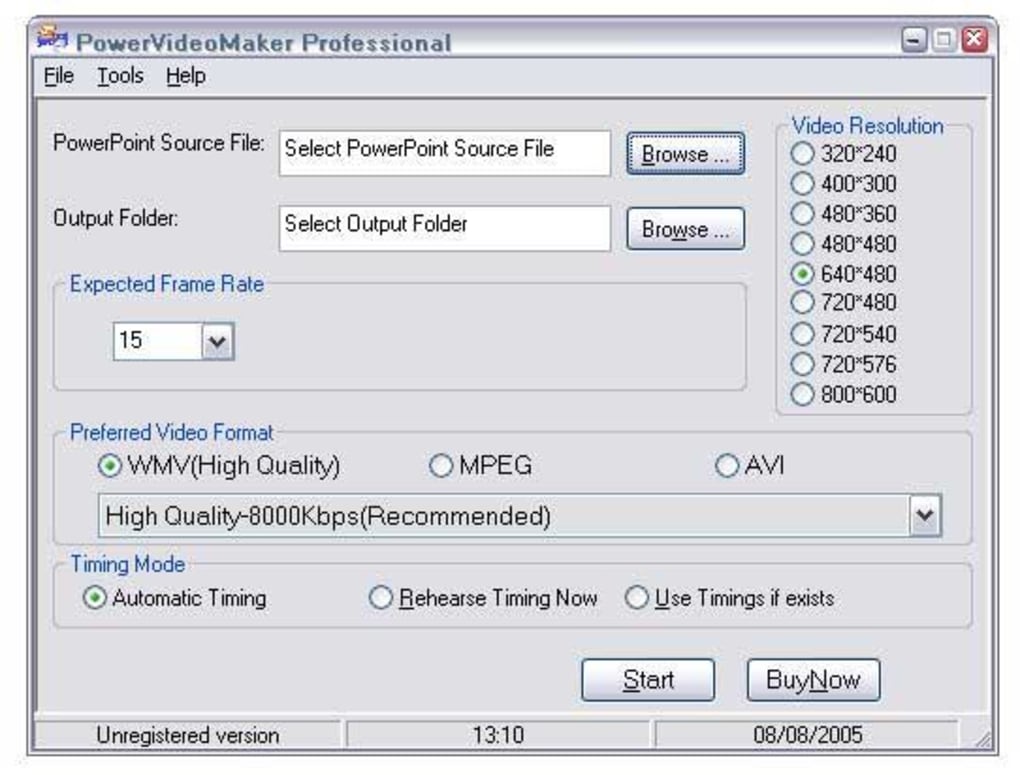
Once installed, launch the application. The main window displays three primary panels: “Source Presentation,” “Output Settings,” and “Conversion Queue.” Click the “Browse” button in the Source panel to locate your PowerPoint file. PowerVideoMaker automatically reads slide dimensions, embedded videos, and audio tracks, presenting a summary of detected elements.
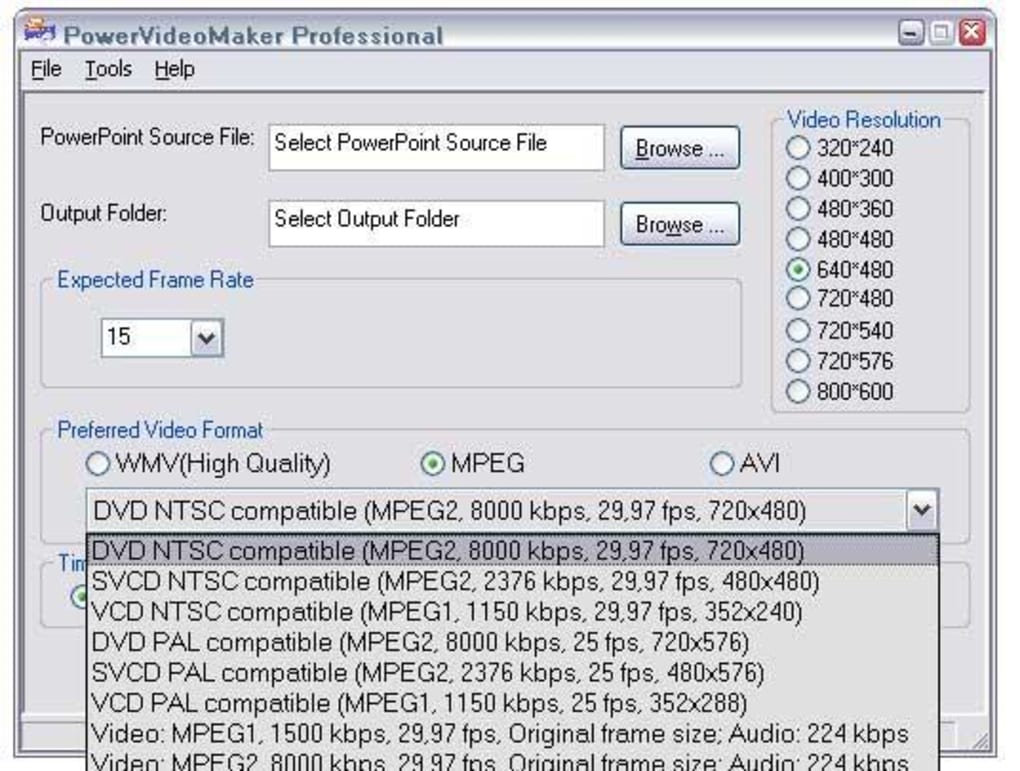
In the Output Settings panel, select your desired video format from the drop‑down list (WMV, AVI, MPEG‑1, MPEG‑2). For each format you can fine‑tune resolution (e.g., 640×480, 800×600), frame rate (15 fps, 30 fps), and audio bitrate (128 kbps, 192 kbps). Advanced users may also enable “Keep original slide timing” to retain the exact pacing set in PowerPoint.
After configuring settings, click “Add to Queue.” The queue panel lets you review multiple files before processing. When ready, hit the “Start Conversion” button. PowerVideoMaker displays a progress bar and estimated time remaining. Upon completion, a notification appears, and you can open the output folder directly from the interface. The trial version imposes no watermarks, so the resulting video is ready for distribution, uploading to YouTube, or embedding in learning management systems.
Compatibility, Pros & Cons
PowerVideoMaker runs on Windows 98 SE, Windows ME, Windows 2000, and Windows XP. It does not support newer operating systems such as Windows 7, 8, 10, or 11, nor does it have macOS, Android, or iOS versions. Because the software is built on legacy APIs, it remains extremely stable on older hardware, making it a viable option for institutions that still operate legacy PCs.
Pros
- Fast, one‑click conversion of PowerPoint to popular video formats.
- Retains animations, transitions, and embedded media without extra codecs.
- Very small installer – ideal for low‑spec machines.
- Batch processing saves time for multiple presentations.
- Free trial version offers full functionality (no watermarks).
Cons
- Limited to Windows 98 SE–XP; no support for modern Windows versions.
- English‑only interface may be a barrier for non‑English speakers.
- Lacks advanced editing features such as subtitles or custom overlays.
- No official updates since 2008 – potential security concerns on older OS.
- Trial version does not include a license key for continued use after the evaluation period.
Frequently Asked Questions
Can PowerVideoMaker convert PowerPoint files with embedded video clips?
Yes. The converter extracts embedded video and audio streams from the PPT file and re‑encodes them into the selected output format, preserving playback quality.
Is there a limit to the length of a presentation that can be converted?
No hard limit exists. The only constraints are available disk space and the processing power of the host PC. Very long presentations may take longer to render.
Does the trial version add a watermark to the output video?
No. PowerVideoMaker’s trial version provides a fully functional conversion engine without watermarks, allowing you to evaluate the software without visual restrictions.
Can I convert a PowerPoint presentation to an animated GIF?
PowerVideoMaker does not support GIF output directly. However, you can export to AVI or WMV and then use a separate tool to convert the video to GIF if needed.
Is the software safe to download from third‑party sites?
Because PowerVideoMaker is an older product, it is best to obtain the installer from reputable download portals that verify file integrity. Always scan the downloaded .exe with an up‑to‑date antivirus program before installation.
Conclusion & Call to Action
PowerVideoMaker remains a niche yet powerful solution for users who need to turn legacy PowerPoint decks into widely compatible video files without paying for modern, subscription‑based converters. Its straightforward workflow, preservation of slide animations, and tiny installation size make it especially attractive for educational institutions and small businesses still operating on older Windows machines. While the lack of support for Windows 7+ and the English‑only UI limit its appeal to a broader audience, the free trial provides a risk‑free way to test its core functionality.
If you are looking for a quick, secure, and cost‑free method to share presentations as videos on YouTube, corporate intranets, or learning platforms, download PowerVideoMaker today and experience hassle‑free conversion. Remember to verify the download source, run a virus scan, and follow the simple installation steps outlined above. Happy converting!







